


PhotoApp - AI Photo Enhancer
4.23.74K Reviews
App Specs
- Version
- 2.9.8
- Updated On
- License
- Free
- Downloads
- 10,000,000+
- Developer
- ScaleUp
- Categories
- Photography
- Platform
- Android, iOS
Screenshots
 Analysis by AppCompare
Ever found yourself scrolling through your photo gallery and thinking, "This pic could use a little magic?" Well, that's where PhotoApp - AI Photo Enhancer comes in. It's like having a digital fairy godmother for your images, making them sparkle with just a few taps. Let me walk you through my experience with this app, and why it's worth checking out.
Where the app fits in a daily photo routine
I find this app most useful when I want to rescue a picture quickly rather than build an elaborate edit from scratch. A family snapshot taken indoors, an old image that looks soft, or a selfie with an uneven complexion can all be candidates for a quick pass through an AI enhancer. The appeal is that the first decision is simple: choose a photo and see whether the automatic result improves it. If it does, I can move on; if it does not, I can still try a more deliberate adjustment or leave the original alone.
A realistic example is finding a slightly blurry picture of a friend in a crowded camera roll just before sharing it. I would duplicate or otherwise keep the original safe, try the enhancement, then compare the result at full size rather than judging only the small preview. That last check matters: sharpening can make a face seem clearer on a phone screen while also making skin texture or edges look unnatural. For a casual post, a modest improvement may be enough; for a print or a photo that matters emotionally, I would be more cautious.
This is a better fit for people who value speed and approachable controls than for editors who want detailed, layer-based retouching. I would recommend trying it on everyday pictures, but I would not treat an AI result as a faithful recovery of details that were never captured. An enhancer can make an image look more defined; it cannot guarantee that the added-looking detail is accurate.
First Impressions
When I first downloaded PhotoApp - AI Photo Enhancer, I was struck by its clean and intuitive interface. The app welcomes you with a straightforward menu, making it super easy to dive right into editing. No daunting tutorials or overwhelming options; it’s designed for everyone, from tech newbies to seasoned pros. It’s like the developers knew exactly what we wanted—simplicity without sacrificing functionality.
That low-friction approach is especially helpful if I only want to improve one image and return to what I was doing. PhotoApp is a free photography app from ScaleUp, and it has an average rating of 4.2 from around 474,000 ratings, with more than 10 million installs. Its Everyone age rating also makes it broadly accessible. Those figures suggest that it has reached a large audience, but they do not tell me whether every image type will suit its editing style, so I still judge each result on its own.
The Magic of AI
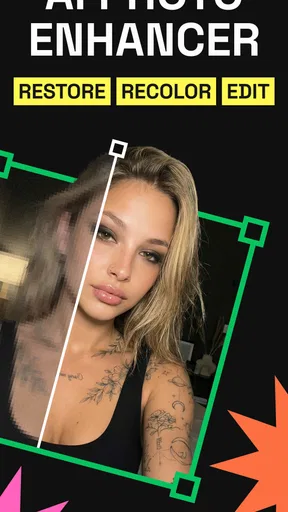
Here's the real kicker: the AI technology behind this app is seriously impressive. You start by selecting a photo from your gallery, and then the app’s AI goes to work. It analyzes the image and suggests enhancements like brightness adjustments, color corrections, and even fixes blemishes. It’s like having a professional photo editor in your pocket. And the best part? You don’t need to do much. The AI does the heavy lifting, and you just sit back and watch your photo transform.
Worth Reading Before You Choose

Flipboard Shows What News Apps Must Do Beyond the Feed

Switching to Android Auto Means Rethinking Your Driving Routine

Google Calendar Makes a Crowded Week Easier to Manage

Ludo King Makes the Most of the Minutes Between Plans

Baby Panda World Brings Quick Play to Modern Phones, but Its Game Library Feels Busy

ESPN’s Live Game View Makes Following Close Games Easier
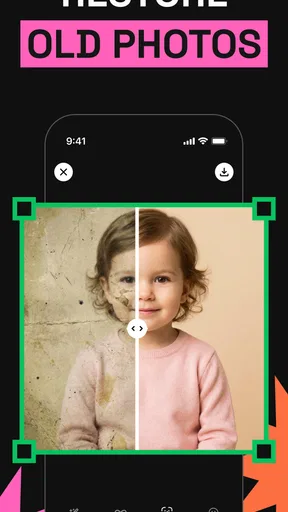
For an older photo, I would use that automatic pass as a starting point, not as a promise that every scratch, blur, or faded area can be restored convincingly. If a face is tiny in the frame or the source image is heavily damaged, the result may look more like a plausible reconstruction than a precise restoration. I recommend comparing faces, hair, lettering, and other recognizable details before keeping an edit. Those are the places where an attractive overall improvement can still introduce changes that matter.
A useful habit is to test the same tool on a copy of the photo and inspect both versions side by side. If the AI makes the image brighter or sharper but changes the character of a person’s face, I would rather keep the softer original. For photos meant mainly for a quick message or social post, that compromise may be acceptable. For family records, documents, or images where accuracy is important, I would use a conventional editor that lets me make controlled corrections and preserve the source.
Features That Stand Out
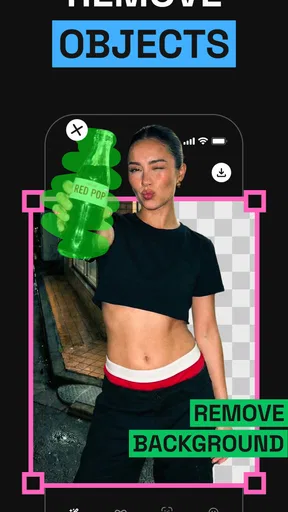
One feature I absolutely love is the background enhancement. You can swap out backgrounds with just a few clicks, turning a dull image into something Instagram-worthy. The artificial intelligence ensures that the edges are smooth and the new background blends seamlessly with the subject.
Background edits are most convincing when the subject is clearly separated from what is behind them. Stray hair, transparent objects, and busy outlines are harder tests than a person standing against a plain wall. I would zoom in around the shoulders and hairline before sharing, because a small cutout flaw can be easy to miss in the preview and obvious once the photo is posted. A simple background can also be a safer choice than a detailed replacement: it draws less attention to imperfect edges.
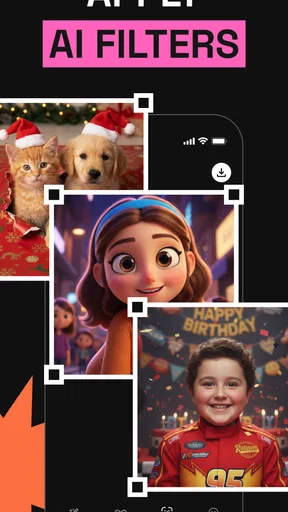
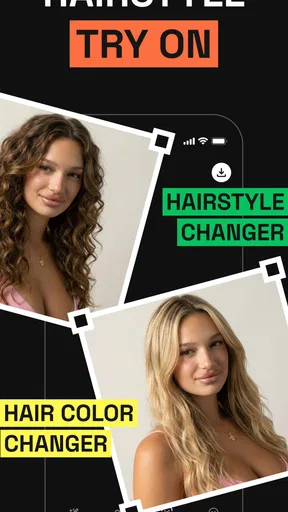
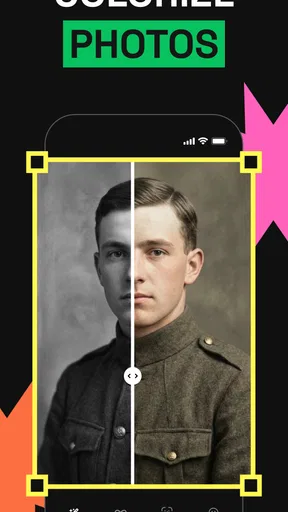
The app also offers a range of filters and effects, similar to what you’d find on popular social media apps, but with more depth and customization options. Whether you’re going for a vintage vibe or a modern aesthetic, there’s something for every mood and style.
Compared with editing directly inside a social platform, a dedicated photography app can be more convenient when I want to work on the image before deciding where it will go. Social apps are often quicker for a last-minute crop or a familiar filter, while a general-purpose desktop editor is the better choice for precise masking, color work, and a repeatable professional workflow. PhotoApp sits between those options: approachable for a one-off improvement, but not a replacement for a full editing suite when every pixel needs deliberate attention.
User-Friendly Tools
Aside from AI enhancements, PhotoApp provides manual tools for those who like to tweak things themselves. You can adjust saturation, contrast, and exposure manually, giving you more control over the final look. It’s perfect for those moments when you want to put a personal touch on your edits.
My practical tip is to make small manual changes after the automatic edit rather than pushing every slider at once. If an image looks too vivid, easing back saturation may help more than adding another filter. If faces look washed out, a slight exposure adjustment may be preferable to repeating the enhancement. The point is to make one change, inspect the whole image, and stop when it looks believable. That keeps the editing process simple and makes it easier to tell which adjustment actually helped.
The app also includes a blemish remover, which is a lifesaver for selfie enthusiasts. Say goodbye to unwanted spots or stray hairs—it’s all about putting your best face forward.
For natural-looking portraits, I would use retouching sparingly and check the surrounding skin after each correction. Removing one temporary spot can be useful; repeatedly smoothing or correcting can make a face look less like the person in the original. This is also where expectations matter: a blemish tool is a quick touch-up, not a substitute for careful portrait retouching when subtle texture and consistent lighting are essential.
Sharing is Caring
Once you’ve got your photo looking just right, sharing it is a breeze. The app seamlessly integrates with social media platforms, so you can post your enhanced photos directly to your favorite networks without any hassle. It's all about showing off those creative edits to your friends and followers, and with such ease, you'll be doing it more often than not.
Even when I plan to share immediately, I prefer to inspect the final image before sending it onward. Check whether the crop still suits the destination, whether the background looks natural at full size, and whether the enhancement has made small details too sharp. Keeping an untouched copy is a sensible precaution for any editing workflow, especially when an image is personally important. That gives me room to try a different look later without losing the original.
It is also worth thinking about the purpose of the picture before editing. A playful filter may suit a social post, while a restored family photograph often benefits from restraint. If I am enhancing an image for someone else, I would avoid assuming that a more polished face or a replaced background is automatically an improvement. The best result depends on what the photo is meant to preserve or communicate.
What to know before relying on it
PhotoApp is free to download, but it offers in-app purchases ranging from $2.49 to $199.99 per item. I would treat the free experience as a way to decide whether its approach suits my pictures before spending anything. Since the possible purchase amounts vary widely, I would check the price and terms shown for a specific item in the app before confirming it, and consider whether I will use the relevant editing options often enough to justify the cost.
The current version is 2.9.5, and the app was released on January 21, 2022. That gives existing users a concrete reference point for the version they are using, but a version number alone does not tell me exactly which tools changed between releases. I would avoid assuming that an update has solved a particular image-quality issue unless I can test that image myself. For someone deciding whether to install it, the more practical question is whether the current editing workflow handles their own common photos well.
The minimum operating-system requirement is Android 7.0. If a device meets that requirement, the next thing I would consider is not just compatibility but how comfortably I can inspect the result on its screen. Fine edge defects and over-sharpening are harder to spot on a small display, so a careful check is worthwhile before sharing or printing. For demanding restoration, product photography, or a job where accurate detail matters, I would compare the result with a more controlled editor instead of relying on an automatic pass alone.
Why You Should Try It
In a world where images speak louder than words, having a tool like PhotoApp - AI Photo Enhancer is a game-changer. It’s not just about making photos look prettier; it’s about expressing your creativity and capturing moments in the best light possible. Whether you’re a casual photo taker or a budding influencer, this app caters to all.
I would especially suggest it to someone who wants a quick way to experiment with enhancement, filters, manual adjustments, and portrait touch-ups without starting with a complex editing interface. It is less suited to anyone who needs predictable, pixel-by-pixel control or cannot accept AI-generated-looking detail in a restoration. In those cases, the standard editor on a phone may be enough for basic corrections, while a more advanced photo editor is the better route for careful masking and consistent results.
For an everyday camera-roll cleanup, the workflow can be simple: choose one image, try the enhancement, check the face and edges, make only the manual adjustments the picture needs, and save or share only after comparing it with the original. That process helps me get the convenience of automation without treating every suggested change as automatically correct. The main thing I would watch as the app evolves is whether improvements make results more dependable across difficult photos, not merely more dramatic on easy ones.
So, if you're ready to give your photos the glow-up they deserve, PhotoApp is a must-try. With its combination of AI-powered magic and user-friendly tools, it’s got everything you need to make your images stand out. Head over to your app store and check it out. Your gallery will thank you!
Pros
- Enhances photos with AI precision.
- User-friendly interface for beginners.
- Batch processing saves time.
- Supports multiple file formats.
- Regular updates with new features.
Cons
- Requires internet for full features.
- Free version has limited tools.
- Occasional lag on older devices.
- Subscription model can be pricey.
- High-quality exports take time.
FAQs for PhotoApp - AI Photo Enhancer
What is PhotoApp - AI Photo Enhancer and what does it do?
PhotoApp - AI Photo Enhancer is a powerful mobile application designed to improve the quality of your photos using advanced artificial intelligence algorithms. It offers features such as automatic enhancement, noise reduction, and detail sharpening to transform your images into stunning, high-quality visuals with just a few taps.
Is PhotoApp - AI Photo Enhancer free to use?
The basic version of PhotoApp - AI Photo Enhancer is free to download and use, offering essential features for photo enhancement. However, there are premium features and tools available through in-app purchases or a subscription model, which provide more advanced editing capabilities and options.
What are the system requirements for installing PhotoApp - AI Photo Enhancer?
PhotoApp - AI Photo Enhancer is compatible with both Android and iOS devices. For Android, it requires version 5.0 or higher, while iOS devices need iOS 11.0 or later. The app is optimized for smartphones and tablets, ensuring smooth performance across various devices.
How user-friendly is PhotoApp - AI Photo Enhancer for beginners?
PhotoApp - AI Photo Enhancer is designed with an intuitive user interface that caters to both beginners and advanced users. The app provides easy-to-follow tutorials and tips, making it simple for anyone to enhance their photos and explore various editing features without prior experience or technical knowledge.
Does PhotoApp - AI Photo Enhancer protect my privacy and data?
Yes, PhotoApp - AI Photo Enhancer prioritizes user privacy and data protection. The app complies with data protection regulations and ensures that all photos and personal information are securely stored and processed. Users can review the privacy policy within the app to understand how their data is handled.


